Best Free PDF Compressors
An evidence-based comparison of eight free PDF compressors—examining lossless stream optimization versus image downsampling, how text and vectors are preserved, where free-tier paywalls apply, and reproducible QaviloPDF compression measurements across six document types.
By QaviloPDF • Published 2026-11-13 • Last verified 2026-11-14
Why PDF Compression Results Vary by Document Type
Not all PDFs shrink the same way, and no compressor can promise a fixed percentage reduction across every file. How much smaller a PDF becomes—and whether its visual quality stays sharp—depends on what is actually inside the file.
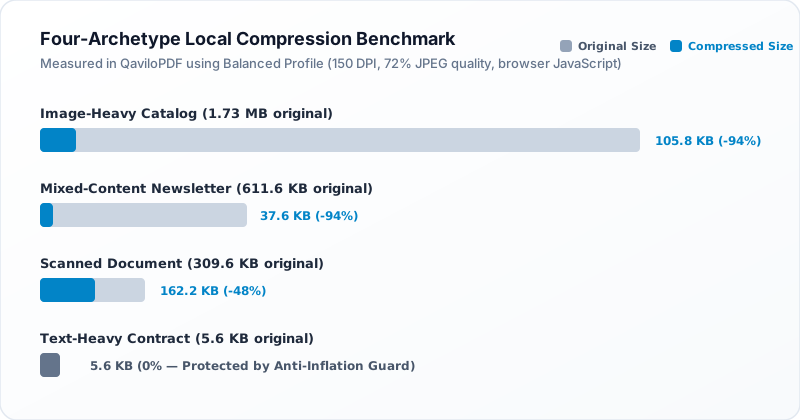
A text-heavy contract built with embedded fonts and vector lines is often already compact; shrinking it mainly relies on lossless Flate stream compression and object cleanup. By contrast, an image-heavy brochure or a scanned multi-page document consists largely of high-resolution raster images, where downsampling DPI and recompressing JPEG streams can cut file size by 50% to 90%+.
This guide evaluates eight widely used free PDF compressors—QaviloPDF, iLovePDF, Smallpdf, PDF24 Tools, Adobe Acrobat Online, PDF2Go, Sejda, and FreeConvert—comparing their controls, free-tier ceilings, quality preservation, and privacy models.
Quick Comparison: 8 Free PDF Compressors
| Compressor | Free Availability | Compression Controls | Account Requirements | Processing Model | Important Limitations | Best Suited For |
|---|---|---|---|---|---|---|
| QaviloPDF | Free, no daily task cap or watermarks | High Quality (200 DPI / Q82), Recommended (150 DPI / Q72), Strong (100 DPI / Q58) + lossless stream deflation & image dedup | No account required | In-browser client-side (/compress-pdf) | 50 MB per-file cap; no grayscale toggle; rejects signed/encrypted PDFs to protect integrity | Private in-browser compression of image-heavy, mixed, and repeated-image PDFs |
| iLovePDF | Free web tier with file/batch caps | Extreme, Recommended, and Less Compression presets | Optional for basic single-file tasks | Cloud servers | Batch processing and higher limits require Premium; cloud upload required | Quick preset-based compression for everyday cloud workflows |
| Smallpdf | Basic compression free (2 tasks/day) | Basic (free); Strong / Moderate compression (Pro only) | Frequent sign-in prompts; Pro trial for Strong | Cloud servers | Strict 2 free tasks/day cap; Strong compression locked behind Pro | Light one-off compression when Basic reduction is sufficient |
| PDF24 Tools | Free web & Windows desktop, no daily caps or watermarks | DPI, image quality %, Normal vs. Lossless mode, and Grayscale conversion | No account required | EU cloud servers (1-hour deletion) or offline Windows PDF24 Creator | Desktop app is Windows-only; online tasks require cloud upload | Granular DPI/grayscale tuning and lossless optimization without paywalls |
| Adobe Acrobat Online | Free web trial/account access; no watermarks | High, Medium, and Low compression levels | No account to try once; free Adobe account for unlimited basic use & saving | Adobe Document Cloud | Cloud upload required; advanced Pro optimization requires paid Acrobat plan | Users wanting Adobe rendering fidelity and cloud Save/Share integration |
| PDF2Go | Free anonymous tier (50 MB, up to 5 files/job) | Basic, Strong, DPI presets (20–300 DPI), and Grayscale option | Optional (free account raises batch limit to 10 files) | Cloud servers | 50 MB anonymous cap; heavy/automated workloads require paid credits | Users needing explicit DPI presets (e.g., 72/150/300 DPI) or grayscale output |
| Sejda | Free web tier (3 tasks/hour, 50 MB, 200 pages) | Image quality %, PPI (72/144/288/720), Grayscale conversion, skip-small-images | No sign-up for basic web tasks | Cloud servers (2-hour deletion) or Desktop app (3 tasks/day free) | 3 tasks/hour, 50 MB, 200 pages, single file per task on free tier | Occasional fine-tuned PPI or grayscale compression on medium files |
| FreeConvert | Free tier metered at 20 conversion minutes/day (5 min/file) | Low, Medium, High, No Compression, Convert to Grayscale, custom presets | No sign-up for standard web use | Cloud servers | 1 GB max upload, but 20 conversion minutes/day quota applies across all tools | Occasional very large files (over 50–100 MB) within daily minute limits |
Individual Product Evaluations
QaviloPDF (/compress-pdf)
QaviloPDF’s Compress PDF tool runs in browser memory using pdf-lib and pako. It pairs three image-optimization presets (High Quality, Recommended, Strong) with automatic lossless FlateDecode stream deflation, Form XObject stream optimization, and duplicate image consolidation.
Main Strengths
- Preserves vector text, fonts, geometric paths, and AcroForm fields without rasterizing pages.
- Consolidates identical repeated raster images across pages to eliminate redundant image streams.
- Includes an anti-inflation guard that never returns an output larger than the original PDF.
- Protects bi-tonal 1-bit CCITT/JBIG2 monochrome scans and rejects digitally signed or encrypted PDFs with clear notices.
Important Limitations
- Enforces a 50 MB per-file ceiling in the browser dropzone to keep client memory predictable.
- Does not expose a grayscale conversion toggle or manual custom DPI slider.
- Skips images with /SMask or /Mask transparency to prevent visual corruption.
Privacy & Processing: All PDF parsing, image downsampling, stream deflation, and output generation run locally in browser memory with zero server uploads.
iLovePDF
iLovePDF offers a streamlined web compressor with three clear presets—Extreme, Recommended, and Less Compression—built for fast everyday reduction.
Main Strengths
- Simple three-level selector requires no technical knowledge of DPI or JPEG quality.
- Vector text remains sharp while embedded raster images are targeted for size reduction.
Important Limitations
- Batch processing multiple files and expanded file-size limits require iLovePDF Premium.
- No custom DPI slider or grayscale toggle on the standard web compressor.
Privacy & Processing: Processes uploaded PDFs on iLovePDF cloud servers with automated deletion windows.
Smallpdf
Smallpdf splits its compressor into Basic Compression (free) and Strong/Moderate Compression (Pro), paired with a strict daily task limit for free users.
Main Strengths
- Polished web interface with cloud storage integrations (Google Drive, Dropbox).
- Basic mode trims redundant structure while keeping strong visual clarity.
Important Limitations
- Strong compression (needed for major shrinkage on scans/photos) is locked behind Smallpdf Pro.
- Strict 2 tasks/day free cap and frequent sign-in/upgrade prompts.
Privacy & Processing: Uploads documents to Smallpdf cloud servers for remote processing.
PDF24 Tools
PDF24 Tools provides one of the most configurable free PDF compressors online and offline (via Windows-only PDF24 Creator), with no watermarks or daily task caps.
Main Strengths
- Exposes granular DPI control, image quality percentage, Normal vs. Lossless mode, and Grayscale/black-and-white conversion.
- Completely free without task counters or mandatory accounts.
- EU-hosted web servers delete files within 1 hour; Windows desktop app runs locally.
Important Limitations
- Offline PDF24 Creator is Windows-only (macOS/Linux users rely on the cloud web tool).
- Web interface looks more utilitarian than modern single-page web apps.
Privacy & Processing: Online compressor uploads files to EU servers with 1-hour deletion; PDF24 Creator processes files locally on Windows.
Adobe Acrobat Online
Adobe Acrobat Online provides a clean web compressor with High, Medium, and Low compression presets backed by Adobe’s PDF rendering engine.
Main Strengths
- High compatibility with complex PDFs, fonts, and transparency layers.
- Three straightforward quality levels (High, Medium, Low compression).
Important Limitations
- Requires uploading documents to Adobe Document Cloud.
- Saving, sharing, and ongoing usage encourage signing into an Adobe account; advanced PDF optimization requires paid Acrobat.
Privacy & Processing: Cloud-processed on Adobe servers; guest uploads are deleted after processing, while signed-in files persist in Document Cloud.
PDF2Go
PDF2Go offers both simple Basic/Strong presets and named DPI presets (from Insane 20 DPI up to Prepress 300 DPI) plus a grayscale toggle.
Main Strengths
- Granular DPI presets (20, 40, 72, 150, 300 DPI) plus Basic/Strong modes.
- Includes grayscale conversion for stripping color data from scans and charts.
Important Limitations
- 50 MB anonymous file limit; larger files (up to 64 GB) and heavy usage require paid credits.
- All compression happens on remote cloud servers.
Privacy & Processing: Uploads files to PDF2Go cloud servers for conversion/compression.
Sejda Compress PDF
Sejda exposes detailed image quality, PPI (72/144/288/720), and grayscale controls in its "More options" drawer, subject to an hourly free task cap.
Main Strengths
- Fine-grained PPI options (72, 144, 288, 720 PPI) and image quality presets (65% default, Good, Best).
- Includes grayscale conversion and an option to skip smaller images for faster processing.
Important Limitations
- 3 tasks/hour cap and single-file-per-task restriction on the free tier.
- 200-page ceiling per document on free web tasks.
Privacy & Processing: Web tasks upload files to Sejda servers and auto-delete after 2 hours; Desktop app runs locally.
FreeConvert
FreeConvert stands out for allowing free uploads up to 1 GB, metering free usage by conversion minutes per day rather than a tiny per-file megabyte wall.
Main Strengths
- Supports free uploads up to 1 GB per file.
- Offers Low, Medium, High, and No Compression levels plus Convert to Grayscale and saved presets.
Important Limitations
- Daily usage is capped by conversion minutes across web and API tasks.
- Cloud upload required, which can be slow for multi-hundred-megabyte files.
Privacy & Processing: Processes uploaded documents on FreeConvert cloud servers.
How We Evaluated PDF Compressors
To avoid misleading cross-product rankings, we separated competitor research from QaviloPDF engine testing. Competitor capabilities, free-tier limits, quality presets, and retention policies were compiled strictly from each provider’s official product documentation and pricing pages verified on November 13, 2026.
For QaviloPDF (/compress-pdf), we inspected the production compression source code (src/utils/pdfCompressUtils.ts) and executed reproducible benchmarks in Node.js v24.22.1 across six independently generated, legally reusable PDF fixtures: text-heavy, image-heavy, scanned-style, mixed text/image, vector-heavy, and repeated-image documents.
Every QaviloPDF output was verified after compression using pdfjs-dist to confirm page count preservation, page dimensions (612 × 792 pt), searchable text extraction, and zero structural parse errors. Because competitor cloud servers were not benchmarked on the same fixture suite, no cross-product numerical ranking is claimed.
QaviloPDF Compression Results (Local Engine Tests)
Measured locally on QaviloPDF’s /compress-pdf engine (Node.js v24.22.1) using the formula ((original - compressed) / original) × 100 across our extended 6-fixture synthetic benchmark set (distinct from the 4-archetype Compression Quality Guide fixture set plotted in Figure 2 above, which was measured on the same engine under Balanced 150 DPI / 72% quality). Notice why the two text/vector rows behave differently: an exported text PDF written with uncompressed streams drops 46.6% (11,007 B to 5,875 B) via lossless Flate deflation, whereas an already-compressed vector PDF (the 2,255 B fixture below or the 5.6 KB contract in Figure 2) holds at 0.0% because QaviloPDF’s Anti-Inflation Guard prevents stream bloat.
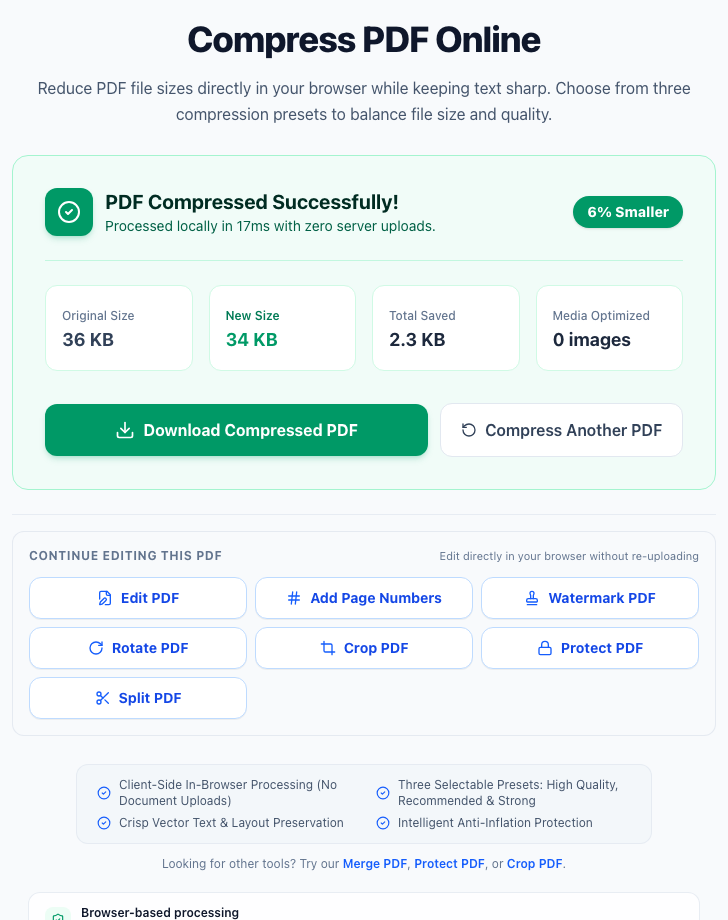
Observed QaviloPDF Interface & Workflow Evidence
Best Free PDF Compressor by Use Case
Text-Heavy PDFs & Contracts: QaviloPDF (High Quality / Recommended) or PDF24 (Lossless)
Both preserve vector typography and searchable text without rasterizing pages, applying lossless stream optimization safely.
Open QaviloPDF Text-Heavy PDFs & ContractsScanned PDFs & Full-Page Images: QaviloPDF (Recommended/Strong), PDF24 (Grayscale), or Sejda
Downsampling high-DPI color scans cuts size dramatically; PDF24 and Sejda also add grayscale conversion when color is unnecessary.
Open QaviloPDF Scanned PDFs & Full-Page ImagesImage-Heavy Brochures & Portfolios: QaviloPDF (High Quality) or iLovePDF (Less/Recommended)
Keeping target DPI around 150–200 DPI reduces multi-megabyte photo embeds without making graphics look blocky.
Open QaviloPDF Image-Heavy Brochures & PortfoliosHigh Visual Fidelity & Print Prep: PDF24 (Lossless/High DPI) or PDF2Go (300 DPI Printer)
When preserving 300 DPI print resolution matters more than aggressive shrinkage, explicit DPI or lossless modes avoid over-compression.
Browser-Side Privacy Without Uploads: QaviloPDF Compress PDF
Runs completely inside browser memory without uploading confidential PDFs to third-party cloud servers.
Open QaviloPDF Browser-Side Privacy Without UploadsFree Compression Without an Account: QaviloPDF, PDF24 Tools, or FreeConvert
All three allow immediate compression without mandatory sign-up walls or Smallpdf-style 2 tasks/day limits.
Open QaviloPDF Free Compression Without an AccountLarge Files Over 50 MB: FreeConvert (up to 1 GB) or PDF24 Creator (Windows Offline)
QaviloPDF and Sejda/PDF2Go free web tiers cap at 50 MB; FreeConvert handles larger uploads within its 20 conversion minutes/day limit.
Lossless vs. Lossy PDF Compression
Choosing between lossless optimization and lossy image recompression determines whether a file shrinks by a modest percentage or drops dramatically—and not every free tool exposes both options.
Why Some PDFs Cannot Be Compressed Much Further
If a PDF barely shrinks—or stays the exact same size—it is usually because the file is already close to its structural floor:
Privacy & Security: Browser-Side vs. Server-Assisted Compression
PDF compression often involves sensitive financial statements, ID scans, or legal contracts, making processing location an important decision.
QaviloPDF’s Compress PDF tool executes strictly in your browser. Separately, QaviloPDF uses server-side LibreOffice WASM processing only for Word-to-PDF and DOC workflows—keeping PDF compression local.
Frequently Asked Questions
Which free PDF compressor is best?
The best free PDF compressor depends on file size, privacy, and control needs. QaviloPDF Compress PDF is ideal for private in-browser compression up to 50 MB without daily caps or sign-up. PDF24 Tools is strongest for free manual DPI and grayscale controls, while FreeConvert handles large files up to 1 GB within its 20 conversion minutes/day quota.
Can I compress a PDF without losing quality?
Yes, for text-heavy and vector PDFs, lossless Flate stream compression and duplicate image consolidation reduce size without degrading visual quality. For image-heavy or scanned PDFs, substantial shrinkage requires downsampling and JPEG recompression, where conservative presets like 150–200 DPI preserve crisp readability with minimal visible difference.
Why is my compressed PDF still large?
A PDF may remain large if its embedded images are already compressed at low DPI, its content streams are already Flate-deflated, it uses bi-tonal CCITT/JBIG2 scan streams, or it contains large embedded font subsets. Well-designed compressors enforce an anti-inflation guard instead of re-encoding already-optimal streams.
Can I compress a scanned PDF?
Yes. Color or grayscale scanned PDFs made of high-resolution raster pages typically shrink the most (often 40% to 90% in our local QaviloPDF tests depending on preset) because image downsampling reduces pixel dimensions. Bi-tonal 1-bit monochrome CCITT/JBIG2 scans are already highly compact and are preserved by QaviloPDF to prevent quality loss.
Does PDF compression affect searchable text?
Proper PDF compression preserves vector text streams, fonts, and invisible OCR text layers so text remains selectable and searchable. Only embedded raster images are resized or recompressed in tools like QaviloPDF, PDF24, and iLovePDF.
Can I compress a PDF without signing in?
Yes. QaviloPDF, PDF24 Tools, Sejda, PDF2Go, iLovePDF, and FreeConvert all allow compressing PDFs without mandatory account registration, though freemium cloud tools enforce hourly, daily, or file-size limits for guest users.
Is browser-based PDF compression more private?
Yes, because browser-based tools like QaviloPDF Compress PDF process your PDF in local device memory without uploading the file to external servers. Cloud compressors transmit files over HTTPS and rely on vendor deletion windows (typically 1–2 hours).
Can compression damage a PDF?
Aggressive lossy compression can make small scanned text or detailed photos blurry, and modifying digitally signed PDFs invalidates cryptographic signatures. QaviloPDF avoids structural damage by preserving vector text, skipping masked transparency images, and rejecting digitally signed or encrypted PDFs with clear guidance.
Related Comparisons & Guides
- Best Free Online PDF Tools
- Best Free Online PDF Editors
- A Free, In-Browser Alternative to iLovePDF
- A Free, In-Browser Alternative to Smallpdf
- How to Compress a PDF Without Losing Readability
Word to PDF | Merge PDF | Split PDF | Compress PDF | Edit PDF
Sources & Verification
QaviloPDF publishes this comparison and is one of the eight PDF compressors evaluated above. QaviloPDF capabilities and compression benchmarks were verified through code inspection (src/utils/pdfCompressUtils.ts) and local reproducible tests across six generated PDF fixtures in Node.js v24.22.1, including pdfjs-dist page-count, dimension, and text-extraction checks. Competitor capabilities, presets, and free-tier limits were researched using official product documentation and pricing pages rather than independent hands-on testing of every competitor.
Internal verification (2026-11-14): Internal codebase inspection of src/utils/pdfCompressUtils.ts and reproducible benchmarks across 6 synthetic PDF fixtures in Node.js v24.22.1 paired with official vendor documentation; no external third-party audit conducted.
- QaviloPDF Compress PDF (QaviloPDF, verified 2026-11-13)
- iLovePDF Compress PDF Documentation (iLovePDF, verified 2026-11-13)
- Smallpdf Compress PDF & Pricing (Smallpdf, verified 2026-11-13)
- PDF24 Tools — Compress PDF (PDF24, verified 2026-11-13)
- Adobe Acrobat Online Compress PDF (Adobe, verified 2026-11-13)
- PDF2Go Compress PDF & Presets (PDF2Go, verified 2026-11-13)
- Sejda Compress PDF & Free Limits (Sejda, verified 2026-11-13)
- FreeConvert Compress PDF & Daily Limits (FreeConvert, verified 2026-11-13)