Best Free Online PDF Editors
A documentation-backed comparison of eight free online PDF editors—examining which platforms genuinely modify existing PDF text versus only adding text overlays, how each handles interactive forms and scanned documents, and where free-tier paywalls apply.
By QaviloPDF • Published 2026-11-13 • Last verified 2026-11-14
What Makes a Free Online PDF Editor Actually Useful?
Searching for a free online PDF editor often leads to a frustrating surprise: many tools labeled as "PDF editors" only let you draw boxes, add sticky notes, or place new text on top of a page—while locking genuine existing-text modification behind a paid subscription or daily task cap.
Unlike general PDF utility suites that focus on merging, splitting, or format conversion, a true PDF editor must handle distinct layers inside a PDF: existing content-stream text operators, overlaid annotations and images, interactive AcroForm fields, and sometimes scanned page images.
This guide compares eight widely used free online PDF editors—QaviloPDF, Sejda, PDFgear, Smallpdf, iLovePDF, Adobe Acrobat Online, PDF24 Tools, and PDFescape—so you can see which capabilities are genuinely free, which require upgrades or desktop apps, and how each tool handles document privacy.
Quick Comparison: 8 Free Online PDF Editors
| Editor | Existing-Text Editing | Add Text & Annotations | Forms | Scanned PDF Support | Free Limitations | Best Suited For |
|---|---|---|---|---|---|---|
| QaviloPDF | Yes (stream replacement for standard-encoded text) | Yes (text, images, highlights, draw, shapes, arrows) | Fill existing AcroForms + create new fields | Companion QaviloPDF OCR PDF tool in-browser (overlays only in editor) | No account or task cap; complex embedded/CJK fonts have fallback limits | Privacy-focused in-browser text edits, forms, and annotations without sign-up |
| Sejda | Yes (direct inline text editing online) | Yes (text, links, images, whiteout, shapes, signatures) | Fill & create form fields | OCR available in separate tool (subject to free limits) | 3 tasks/hour, 50 MB max, 200 pages max on free web tier | Occasional direct text edits on short documents without watermarks |
| PDFgear | Limited online (desktop app has direct text editing) | Yes (new text boxes, highlights, shapes, images, signatures) | Fill interactive & flat forms online; create forms on desktop | No full OCR online; free OCR in PDFgear Desktop | No sign-up or watermarks; full text/OCR editing requires desktop install | Users willing to pair free online annotations with a free desktop app |
| Smallpdf | Pro only (paid subscription required) | Yes (add text, highlights, shapes, drawings, images) | Basic fill/sign workflows; advanced features Pro | OCR is Pro only | Strict 2 free tasks/day cap; frequent sign-in and Pro upgrade prompts | Light one-off markup when you do not need to edit existing text |
| iLovePDF | Premium or convert-to-Word workaround | Yes (text overlays, comments, shapes, drawings, images) | Fill & sign workflows; advanced tools Premium | OCR / PDF/A features require Premium | Daily/session limits and 15–200 MB file caps on free tier | Teams already using iLovePDF for quick markup and conversion workflows |
| Adobe Acrobat Online | Paid Acrobat Standard / Pro only | Yes (comments, sticky notes, highlights, drawing) | Fill & Sign included free (account needed to save/share) | OCR and redaction require paid plan | Guest edits are temporary; Adobe account required for saving & sharing | Reviewers needing trusted comments and Fill & Sign in the Adobe ecosystem |
| PDF24 Tools | Limited online (utility/overlay oriented) | Yes (add text, images, shapes, freehand annotations) | Basic form filling / PDF utility workflows | Dedicated free online OCR tool available separately | No sign-up or watermarks, but lacks rich native paragraph editing online | Free utility markup and EU-hosted conversions without daily caps |
| PDFescape | No online (requires paid Desktop/Premium) | Yes (new text boxes, whiteout, shapes, freehand, images) | Fill existing forms + create basic form fields online | No OCR on free online tier | 10 MB max file size and 100 pages max on free online tier | Simple form creation and whiteout-style overlays on small PDFs |
Individual Product Evaluations
QaviloPDF (/edit-pdf)
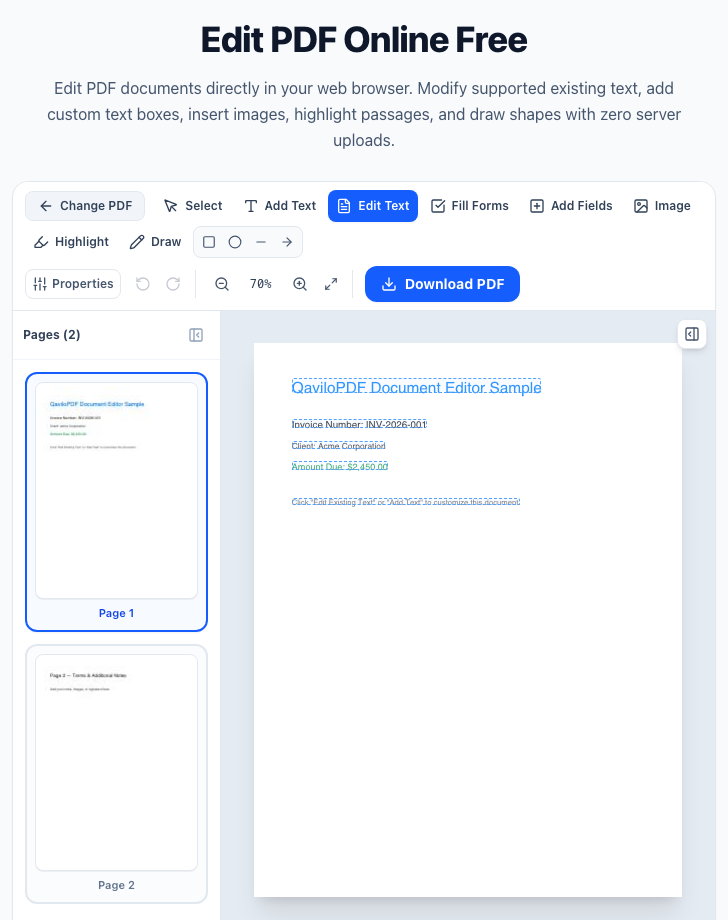
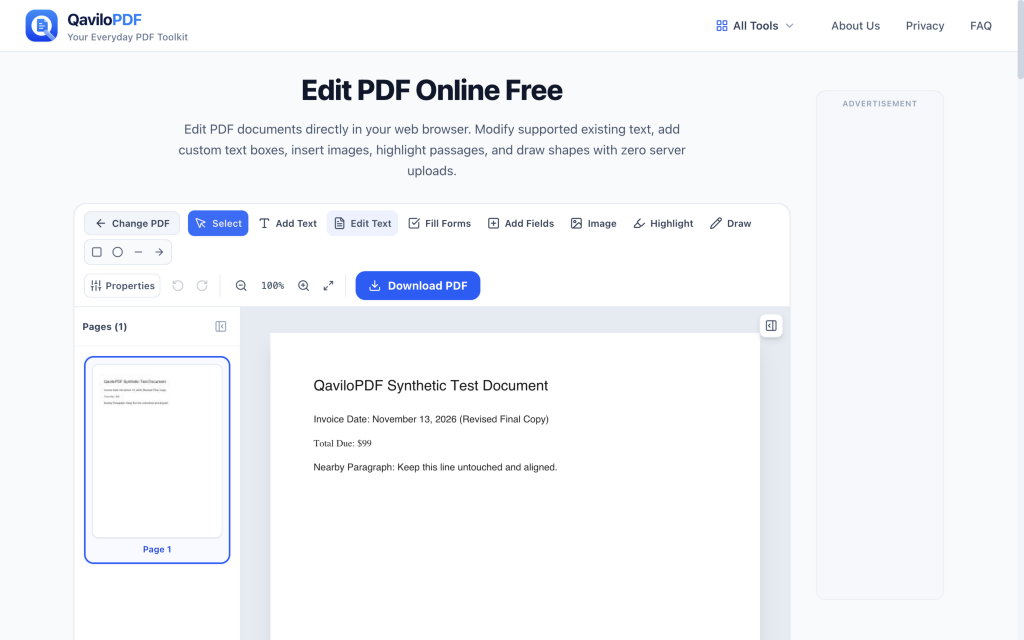
QaviloPDF’s Edit PDF workspace runs inside your browser without uploading documents to external servers. Unlike overlay-only editors, it supports genuine PDF content-stream replacement for standard-encoded existing text alongside new text, images, highlights, freehand drawing, shapes, and interactive AcroForm filling and field creation.
Main Strengths
- Genuine content-stream text replacement removes original text operators for standard-encoded text rather than merely hiding text behind white rectangles.
- Supports adding new text (Helvetica, Times Roman, Courier), inserting PNG/JPG images with transparency, highlights, freehand drawing, rectangles, circles, lines, and arrows.
- Detects, fills, and preserves interactive AcroForm fields, and lets users create new interactive text, checkbox, radio, and dropdown fields.
- Runs client-side in browser memory with undo/redo history and zero sign-up or daily task caps.
Important Limitations
- The /edit-pdf workspace itself applies overlays/annotations on scanned images rather than running OCR automatically (use QaviloPDF’s companion /ocr-pdf tool first if you need a searchable/copyable English text layer, up to 20 pages desktop / 5 pages mobile).
- Complex embedded subset fonts, custom encodings, or unsupported Unicode/CJK scripts may fall back or require standard font substitution.
- No cloud storage, team commenting threads, or multi-party e-signature routing.
Privacy & Processing: All /edit-pdf inspection, editing, and PDF export run locally in browser memory via pdf-lib and PDF.js, without sending document bytes to remote servers.
Sejda PDF Editor
Sejda is one of the few cloud PDF editors that allows direct inline editing of existing PDF text on its free web tier without stamping watermarks.
Main Strengths
- Direct inline editing of existing PDF text, links, and layout elements in the browser.
- Includes whiteout, signatures, images, shapes, and form field creation without mandatory sign-up.
- Automatic server deletion after 2 hours on the web tier, plus an optional Sejda Desktop app.
Important Limitations
- Free web tier is capped at 3 tasks per hour, 50 MB file size, and 200 pages per document.
- Single-file-per-task workflow on free tier; batch automation requires paid upgrade.
- Web editing uploads documents to Sejda servers for processing.
Privacy & Processing: Web editor uploads PDFs to Sejda servers and automatically deletes files after 2 hours; Sejda Desktop processes files locally (also capped at 3 free tasks/day).
PDFgear
PDFgear offers both a free online PDF editor and a free desktop application for Windows and macOS with no sign-up or watermarks. However, its online and desktop editors have meaningfully different capabilities.
Main Strengths
- No sign-up, no watermarks, and no published daily task cap on core free features.
- Online editor cleanly handles new text boxes, highlights, shapes, images, and filling forms.
- PDFgear Desktop adds direct existing-text editing, multi-language OCR, and fillable form creation.
Important Limitations
- Online editor has limited native existing-text editing and lacks full document-wide OCR.
- Full editing power requires downloading and installing the desktop application.
Privacy & Processing: Online editor processes uploaded files on cloud servers with automatic cleanup; PDFgear Desktop runs locally offline.
Smallpdf
Smallpdf provides a polished web interface for adding text, highlights, shapes, and drawings, but reserves genuine existing-text editing and OCR for paid Pro subscribers.
Main Strengths
- Clean, beginner-friendly canvas for adding annotations, highlights, shapes, and new text.
- Consistent web and mobile UX with cloud storage integrations.
Important Limitations
- Editing existing PDF text and OCR are locked behind Smallpdf Pro.
- Free tier is strictly limited to 2 tasks per day with frequent sign-in prompts.
Privacy & Processing: Files are uploaded to Smallpdf cloud servers for processing and temporary storage.
iLovePDF
iLovePDF’s online Edit PDF tool focuses on adding text overlays, comments, shapes, drawings, and images. Modifying existing PDF text typically requires converting to Word or upgrading to Premium.
Main Strengths
- Fast, familiar toolbar for adding text boxes, shapes, images, and visual markup.
- Integrates cleanly with iLovePDF’s broader merge, split, and PDF-to-Word tools.
Important Limitations
- No free native inline replacement of existing PDF text streams; OCR and advanced editing require Premium.
- Free tier enforces file-size and daily/session caps (15–200 MB depending on tool).
Privacy & Processing: Server-side cloud processing with automatic deletion windows (typically up to 2 hours for guest tasks).
Adobe Acrobat Online
Adobe Acrobat Online sets the industry standard for reviewing and Fill & Sign workflows, but its free web tier stops short of modifying existing PDF text.
Main Strengths
- Reliable rendering of complex PDFs, comments, sticky notes, highlights, and Fill & Sign.
- Strong compatibility with corporate review workflows and Adobe Document Cloud.
Important Limitations
- True existing-text editing, OCR, and redaction require paid Acrobat Standard or Pro.
- Guest sessions are temporary; saving or sharing generally requires signing into an Adobe account.
Privacy & Processing: Files are uploaded to Adobe Document Cloud servers and tied to your Adobe account when saved.
PDF24 Tools
PDF24 offers a generous set of completely free online PDF utilities and the offline Windows PDF24 Creator, with no sign-up or watermarks.
Main Strengths
- Free to use without task caps, watermarks, or account registration.
- Includes a separate free online OCR tool and a full Windows desktop offline suite.
- EU-based servers automatically delete uploaded files within one hour.
Important Limitations
- Online editor is utility/overlay focused and lacks rich native paragraph editing of existing PDF text.
- Offline desktop app (PDF24 Creator) is Windows-only.
Privacy & Processing: Online tools upload files to EU servers with 1-hour deletion; Windows desktop app runs locally.
PDFescape
PDFescape has long been used for quick form creation and whiteout-style overlays in the browser, though its free online tier carries tight file limits and lacks existing-text editing.
Main Strengths
- Allows creating basic interactive form fields (text, checkbox, radio, dropdown) online for free.
- Includes whiteout tool, new text boxes, shapes, and freehand drawing without mandatory sign-up.
Important Limitations
- Free online tier is capped at 10 MB file size and 100 pages.
- Cannot edit existing PDF text online (requires paid Desktop/Premium plans).
Privacy & Processing: Server-assisted web editor for free online sessions; desktop editing is Windows-only and paid.
Observed QaviloPDF Interface & Workflow Evidence
Which Free PDF Editor Is Best for Each Task?
Fixing Typos in Existing PDF Text: QaviloPDF (Standard Text) or Sejda
Both modify existing PDF text rather than forcing paid upgrades. QaviloPDF runs locally in the browser with no hourly cap; Sejda is useful for occasional cloud edits up to 3 tasks/hour.
Open QaviloPDF Fixing Typos in Existing PDF TextFilling & Creating Interactive Forms: QaviloPDF or PDFescape (small files)
QaviloPDF inspects, fills, and creates AcroForm fields (text, checkbox, radio, dropdown) in-browser without PDFescape’s 10 MB / 100-page limit.
Open QaviloPDF Filling & Creating Interactive FormsAdding Annotations, Highlights & Notes: QaviloPDF, Adobe Acrobat Online, or PDFgear
If you only need comments, highlights, shapes, or Fill & Sign, all three handle markup reliably; QaviloPDF keeps the file in local browser memory.
Open QaviloPDF Adding Annotations, Highlights & NotesPrivacy-Sensitive Contracts & Records: QaviloPDF (Browser) or PDFgear / PDF24 (Desktop)
Client-side browser editing in QaviloPDF avoids uploading confidential documents to third-party servers, while desktop apps keep processing offline.
Open QaviloPDF Privacy-Sensitive Contracts & RecordsScanned PDFs Needing OCR: QaviloPDF OCR PDF, PDF24 OCR, or PDFgear Desktop
Scanned PDFs are images without selectable text streams. QaviloPDF’s dedicated /ocr-pdf tool adds a searchable, copyable English text layer locally in-browser (up to 20 pages desktop / 5 mobile), while PDF24 and PDFgear offer multi-language or desktop OCR workflows.
Open QaviloPDF Scanned PDFs Needing OCRHeavy Structural Rewrites & Reflow: Convert to Word (via Third-Party Tool) or Use PDFgear Desktop / Acrobat Pro
When you need multi-paragraph reflow across columns or tables, converting the PDF back to Word or using a full desktop suite avoids layout collisions. Note that QaviloPDF converts Word to PDF, not PDF to Word.
Editing Existing PDF Text vs. Adding Text Overlays
Understanding how PDFs store text explains why free online editors behave so differently—and why whiteout overlays often break searchability and accessibility.
Client-Side Browser Editors vs. Cloud-Uploaded Editors
Where your PDF is processed matters just as much as which toolbar buttons an editor offers.
QaviloPDF’s Edit PDF tool runs completely in your browser. Separately, QaviloPDF uses server-side LibreOffice conversion only for Word-to-PDF and legacy DOC workflows—keeping core PDF editing local.
Frequently Asked Questions
Which free online PDF editor actually lets you edit existing text?
Among free web editors without watermarks, QaviloPDF Edit PDF supports content-stream replacement for standard-encoded existing PDF text directly in the browser, and Sejda supports direct inline text editing up to 3 tasks/hour (50 MB / 200 pages). Smallpdf, Adobe Acrobat Online, iLovePDF, and PDFescape reserve true online existing-text editing for paid tiers.
Why do some free PDF editors only let you add new text instead of changing old text?
Adding a new text box on top of a page is straightforward overlay drawing, whereas modifying existing text requires parsing PDF content streams, character encodings, and embedded font subsets. Many freemium tools keep overlays free and paywall stream-level text editing.
Can I fill and create interactive PDF form fields for free online?
Yes. QaviloPDF lets you inspect, fill, and create interactive AcroForm fields (text, checkbox, radio, and dropdown) in the browser without file-size or daily task caps up to 50 MB per PDF. PDFescape also allows basic form creation online, though its free tier is capped at 10 MB and 100 pages.
Can a free online PDF editor edit scanned PDF documents?
Scanned PDFs are raster images with no digital text layer until Optical Character Recognition (OCR) is run. You can annotate or place whiteout/text overlays directly on scans in QaviloPDF Edit PDF, and run QaviloPDF OCR PDF in your browser to add a searchable English text layer (or use PDF24 OCR / PDFgear Desktop for multi-language or desktop OCR).
Is it safe to edit confidential PDFs in a free online editor?
Client-side browser editors like QaviloPDF Edit PDF process your document in local browser memory without uploading it to external servers. Cloud-based editors upload files to vendor servers with scheduled deletion windows (typically 1–2 hours), so client-side or offline desktop tools are preferable for sensitive records.
Does QaviloPDF add watermarks or limit daily PDF edits?
No. QaviloPDF’s Edit PDF tool adds no watermarks, requires no sign-up, and enforces no daily or hourly task limits.
When should I convert a PDF to Word instead of editing it directly?
If you need to rewrite long multi-paragraph sections, reflow tables across pages, or overhaul document layout, converting or rebuilding the source document is cleaner than editing fixed PDF coordinates. For targeted text fixes, form filling, and annotations, a PDF editor is faster.
Related Comparisons & Guides
- Best Free Online PDF Tools
- A Free, In-Browser Alternative to iLovePDF
- Why Is Editing PDF Text So Difficult? Fonts, Layouts, and Common Problems Explained
Word to PDF | Merge PDF | Split PDF | Compress PDF | Edit PDF
Sources & Verification
QaviloPDF publishes this comparison and is one of the eight PDF editors evaluated above. QaviloPDF capabilities were checked through local functional tests—including downloaded-PDF export verification via PDF.js text extraction, AcroForm field inspection, and multi-page rotation checks—while competitor capabilities, file/page limits, and pricing tiers were researched using each provider’s official product documentation and pricing pages rather than independent hands-on testing of every competitor.
Internal verification (2026-11-14): Internal codebase inspection of QaviloPDF /edit-pdf and local synthetic fixture tests paired with published vendor documentation; no external third-party audit conducted.
- QaviloPDF Edit PDF (QaviloPDF, verified 2026-11-13)
- Sejda Online PDF Editor & Free Tier Limits (Sejda, verified 2026-11-13)
- PDFgear Online & Desktop PDF Editor (PDFgear, verified 2026-11-13)
- Smallpdf Edit PDF & Pricing (Smallpdf, verified 2026-11-13)
- iLovePDF Edit PDF & Plans (iLovePDF, verified 2026-11-13)
- Adobe Acrobat Online PDF Editor (Adobe, verified 2026-11-13)
- PDF24 Tools — Edit PDF (PDF24, verified 2026-11-13)
- PDFescape Free Online PDF Editor (PDFescape, verified 2026-11-13)