Best Free Online PDF Tools
A practical, documentation-backed comparison of eight widely used online PDF suites—examining what is genuinely free, where daily caps or sign-in gates appear, how text editing and OCR behave, and whether files are processed in your browser or on remote servers.
By QaviloPDF • Published 2026-11-13 • Last verified 2026-11-16
How to Evaluate Free Online PDF Tools
Choosing a free online PDF tool depends far more on what you are trying to do—and what restrictions you can tolerate—than on who has the longest feature checklist. Two tools that both advertise "free PDF editing" can behave completely differently in practice: one may let you rewrite existing paragraphs without a login up to an hourly cap, while another only lets you place text boxes on top of a page or requires an account before downloading.
Before uploading a document, it helps to evaluate five practical dimensions: task coverage (especially Word-to-PDF conversion, OCR, and true text editing), free-plan throttling (daily or hourly caps, file-size limits, and batch ceilings), sign-in requirements, document privacy (in-browser execution vs. remote server processing), and conversion fidelity on complex layouts.
This guide compares eight widely used platforms—QaviloPDF, iLovePDF, Smallpdf, PDF24 Tools, PDF2Go, Sejda, Adobe Acrobat Online, and TinyWow—using verified official documentation, published pricing pages, and architectural inspection rather than synthetic scores.
Quick Comparison: 8 Free Online PDF Tools
| Tool | Best Suited For | Key Free Capabilities | Account Requirements | Processing Approach | Important Limitations |
|---|---|---|---|---|---|
| QaviloPDF | No-sign-up browser workflows, privacy-conscious merging/splitting/editing, PDF repair, Excel/CSV & clean Word-to-PDF | Merge, split, extract, rotate, organize, crop, compress, edit PDF, repair, OCR, compare, redact, protect/unlock, Word/Excel/CSV-to-PDF, PDF-to-JPG | No account required | Hybrid: core PDF tools run locally in-browser via JavaScript and WebAssembly (Tesseract.js for OCR, QPDF for Repair PDF); Word-to-PDF uses bounded server LibreOffice WASM | 50 MB per PDF (50 MiB Repair PDF cap with 60-page verification limit; 20 files / 150 MB merge cap); OCR is English-only (20 pages desktop / 5 mobile); Word-to-PDF 15 MB/400 pages; no desktop/mobile apps |
| iLovePDF | All-around cloud conversions, Office formats, and cross-platform web/desktop/mobile workflows | Merge, split, compress, repair, Office-to-PDF, PDF-to-JPG, rotate, unlock, protect (capped) | Optional for basic single tasks; free email account for Drive/Dropbox & light batching | Server-side cloud processing on web; optional paid Windows/Mac desktop apps | 15 MB–200 MB free file caps (tool-dependent); ~25-file batch limit; heavy OCR & AI tools require Premium ($9/mo monthly or $60/yr billed annually); displays ads |
| Smallpdf | Occasional quick conversions with a polished UI and cloud storage integrations | Basic compress, merge, split, Word/Excel/PPT conversions, e-sign | Often prompts for sign-in; Pro trial requires account + payment card | Server-side cloud processing | Strict 2 free tasks/day cap; strong compression, OCR, and direct text editing locked to Pro (~$15/mo monthly or ~$10/mo billed annually) |
| PDF24 Tools | Unthrottled free online utilities and Windows users wanting an offline desktop companion | Merge, split, compress, edit/annotate, OCR, convert, repair, protect/unlock, page organization | No registration or account required | Online tools upload to EU/German servers (deleted within 1 hour); Windows PDF24 Creator runs offline | Online web UI is ad-supported and dated; very large files hit browser memory limits online; offline Creator is Windows-only |
| PDF2Go | Broad format conversions and browser-based annotation/OCR testing | Merge, split, compress, convert, basic PDF editor, light OCR testing | No account strictly required for basic use; free account adds welcome credits | Server-side cloud processing with standard queue on free tier | ~50 MB free file limit, capped daily tasks, queue waits at peak hours; heavy OCR & batch workflows require Starter ($8/mo) or Pro ($29/mo) |
| Sejda | Editing existing PDF text directly online without watermarks | Direct PDF text editing, merge, split, compress, protect, unlock, basic OCR | No sign-up required for free tier | Cloud servers on web (auto-deleted after 2 hours); Sejda Desktop processes locally | Strict 3 tasks/hour cap (or 3/day on Desktop free), 50 MB / 200-page file limits, single file per task; OCR/conversions have tighter page caps |
| Adobe Acrobat Online | Official Adobe rendering fidelity, fillable forms, and Fill & Sign workflows | Basic compress, merge, split, Office conversions, Fill & Sign (with free account) | Guest mode allows quick single tasks; free Adobe account required to save/share or use full free set | Server-side cloud processing on Adobe servers | Direct text editing, OCR, redaction, and bulk e-sign tracking require paid Acrobat Standard ($14.99/mo) or Pro ($19.99/mo) |
| TinyWow | Quick one-off PDF, image, and utility conversions without registering | Merge, split, compress, PDF-to-Word, PDF-to-JPG, basic edits and conversions | No registration required | Server-side cloud processing (files auto-deleted within 1 hour) | Ad-supported with occasional reCAPTCHA checks; heavy/AI usage triggers caps; Supporter plan ($5.99/mo or $49.99/yr) removes ads/CAPTCHAs |
Individual Product Evaluations
QaviloPDF
QaviloPDF is an online PDF toolkit built around a hybrid execution model: everyday PDF manipulation, repair, and conversion—including merging, splitting, extracting, rotating, organizing, cropping, compressing, text/AcroForm editing, comparing, redacting, repairing damaged PDFs, Excel (.xlsx)/CSV-to-PDF, signing, protecting, and unlocking—runs directly inside your browser via client-side JavaScript libraries and WebAssembly modules (Tesseract.js for OCR PDF, QPDF in a Web Worker for Repair PDF), while Word-to-PDF conversion uses a bounded backend LibreOffice WASM worker.
Main Strengths
- Core PDF utilities execute locally in browser memory, avoiding remote cloud queues for standard PDF-to-PDF, repair, and spreadsheet tasks.
- No account creation, email gate, or daily task counter blocks core tools.
- Edit PDF supports genuine content-stream text replacement and AcroForm field preservation in addition to annotations.
- Word-to-PDF enforces preflight ZIP/XML validation and bounded transient processing without persistent document storage.
Important Limitations
- No native Windows, macOS, iOS, or Android desktop/mobile apps—browser only.
- Client-side tools (especially OCR, Repair PDF capped at 50 MiB with a 60-page verification limit, and large merges) are bounded by device browser memory, and damaged PDFs with missing or overwritten streams cannot be guaranteed to recover.
- Word-to-PDF is not local-only: it transfers the document over HTTPS to QaviloPDF’s transient conversion backend and enforces size (15 MB) and structural complexity (400-page) limits.
Privacy & Processing: QaviloPDF uses a transparent hybrid model. Client-side PDF tools process document bytes in browser memory without transmitting files to remote servers. Word-to-PDF conversion sends the file to an isolated LibreOffice WASM subprocess in transient memory and cleans up temporary buffers after conversion.
iLovePDF
iLovePDF is one of the most widely recognized web-based PDF platforms, offering a broad catalog of conversion, compression, organization, and signing tools across web, desktop, and mobile.
Main Strengths
- Wide format coverage, including PDF-to-Word, PDF-to-Excel, PDF-to-PowerPoint, and HTML-to-PDF.
- Clean, straightforward task-focused interface with Google Drive and Dropbox integrations.
- Cross-platform ecosystem spanning Web, Windows/Mac Desktop, and iOS/Android apps on paid plans.
Important Limitations
- Free file-size caps range from roughly 15 MB to 200 MB depending on the tool, and batch merging is capped (~25 files).
- Advanced OCR (scanned PDFs to editable Office files), AI tools, and full digital signature workflows require Premium ($9/month billed monthly or $60/year).
- Free web interface displays ads and relies on server-side uploads.
Privacy & Processing: Web tools upload documents over HTTPS to iLovePDF cloud servers for processing. Users who need local offline processing must subscribe to Premium to unlock the desktop application.
Smallpdf
Smallpdf focuses on a clean, beginner-friendly interface with cloud storage connectors and a large suite of PDF conversion and compression utilities.
Main Strengths
- Intuitive, uncluttered user interface suitable for quick non-technical tasks.
- Strong cloud ecosystem integrations (Google Drive, Dropbox) and team management on paid tiers.
- Offers a 7-day Pro trial for evaluating advanced features.
Important Limitations
- Strict free limit of 2 tasks per day; hitting the cap requires waiting 24 hours or upgrading to Pro (~$15/month, or ~$10/month billed annually in published US pricing).
- Direct PDF text editing, OCR for scanned documents, Strong Compression, and batch processing are locked behind Pro.
- 7-day free trial requires entering payment details upfront and auto-renews unless canceled.
Privacy & Processing: All web tasks are processed on Smallpdf’s cloud servers. Free-tier users are frequently prompted to sign in so usage can be metered against the 2-task daily allowance.
PDF24 Tools
Developed in Germany, PDF24 Tools stands out by offering its entire online toolkit completely free—without paid tiers, watermarks, or registration—alongside a free offline Windows desktop app (PDF24 Creator).
Main Strengths
- Completely free for both personal and commercial use with no paid upsell tiers or watermarks.
- No account or email registration required for either the web tools or PDF24 Creator.
- Includes OCR, compression, merging, splitting, rotation, and page organization without artificial daily task caps.
Important Limitations
- Online web tools upload files to PDF24’s servers (hosted primarily in Germany/EU) rather than processing locally in the browser.
- The web interface is ad-supported and visually more utilitarian than modern suites.
- Offline PDF24 Creator is Windows-only; macOS and Linux users only have the cloud web tools.
Privacy & Processing: PDF24 states that files uploaded to its online tools are transmitted over HTTPS and automatically deleted from its EU/German servers within one hour. Windows users can keep files entirely offline with PDF24 Creator.
PDF2Go
PDF2Go provides a broad set of browser-accessible PDF conversion, compression, repair, and annotation tools backed by tiered cloud processing plans.
Main Strengths
- Includes a browser-based PDF editor for adding text, shapes, highlights, and images.
- Supports OCR testing and a wide variety of input/output conversions.
- Offers flexible Starter ($8/month), Pro ($29/month), and pay-as-you-go credit options for occasional heavy batches.
Important Limitations
- Free tier is typically capped around 50 MB per file with daily task limits and standard (non-priority) queue wait times.
- Heavy OCR, batch processing, and AI-assisted extraction require Starter ($8/mo) or higher plans.
- Free web pages include advertisements.
Privacy & Processing: PDF2Go processes documents on remote cloud servers. Free-tier jobs enter a shared standard processing queue.
Sejda
Sejda is well known for offering genuine in-page PDF text editing online without forcing watermarks on free exports, paired with a cross-platform desktop client.
Main Strengths
- Supports direct modification of existing PDF text (fixing typos, adjusting fonts/sizes) without adding watermarks.
- No account required for free web tasks.
- Offers Sejda Desktop (Windows, macOS, Linux) for local offline processing.
Important Limitations
- Strict 3 tasks/hour ceiling on the web makes multi-step or batch workflows slow on the free plan.
- Restricted to a single file per task on free tiers; batch processing requires upgrading.
- Web tasks upload files to cloud servers (retained for up to 2 hours before automatic deletion).
Privacy & Processing: Sejda Web uploads files over HTTPS to cloud servers and states they are automatically deleted after 2 hours. Sejda Desktop processes files locally on your computer.
Adobe Acrobat Online
Adobe Acrobat Online brings a subset of Adobe’s desktop PDF tools to the browser, offering reliable rendering and seamless handoff to Acrobat Standard ($14.99/mo) and Acrobat Pro ($19.99/mo).
Main Strengths
- High rendering compatibility on complex forms, layered PDFs, and print-oriented layouts.
- Strong Fill & Sign experience for completing forms and applying your own signature.
- Free Adobe account (no credit card required) unlocks cloud storage and sharing links.
Important Limitations
- Direct text/image editing, OCR on scanned PDFs, permanent redaction, and multi-party e-signature tracking require paid Acrobat Standard or Pro plans.
- Guest uploads are temporary, and fuller free usage nudges users to sign in with an Adobe account.
- Annual commitments billed monthly may carry early termination fees after the 14-day window.
Privacy & Processing: Adobe Acrobat Online processes uploaded documents on Adobe’s cloud servers. Guest-mode files are temporary for the session, while signed-in workflows can persist files to Adobe Cloud Storage.
TinyWow
TinyWow is a broad browser utility hub covering PDF tools alongside image, video, and AI writing utilities, designed for quick anonymous access.
Main Strengths
- No account or sign-up required for standard tools.
- Covers common PDF operations (merge, split, compress, PDF-to-Word, PDF-to-JPG) alongside non-PDF file utilities.
- Low-cost Supporter tier ($5.99/mo or $49.99/yr) removes ads and CAPTCHAs.
Important Limitations
- Ad-supported interface with occasional reCAPTCHA verification prompts before file processing.
- Heavy usage or AI-backed tools can trigger usage caps and upgrade prompts.
- All processing occurs server-side rather than locally in the browser.
Privacy & Processing: Files are uploaded over HTTPS and processed on TinyWow’s servers, with automatic deletion stated within 1 hour (reusing a file in another tool can reset the timer).
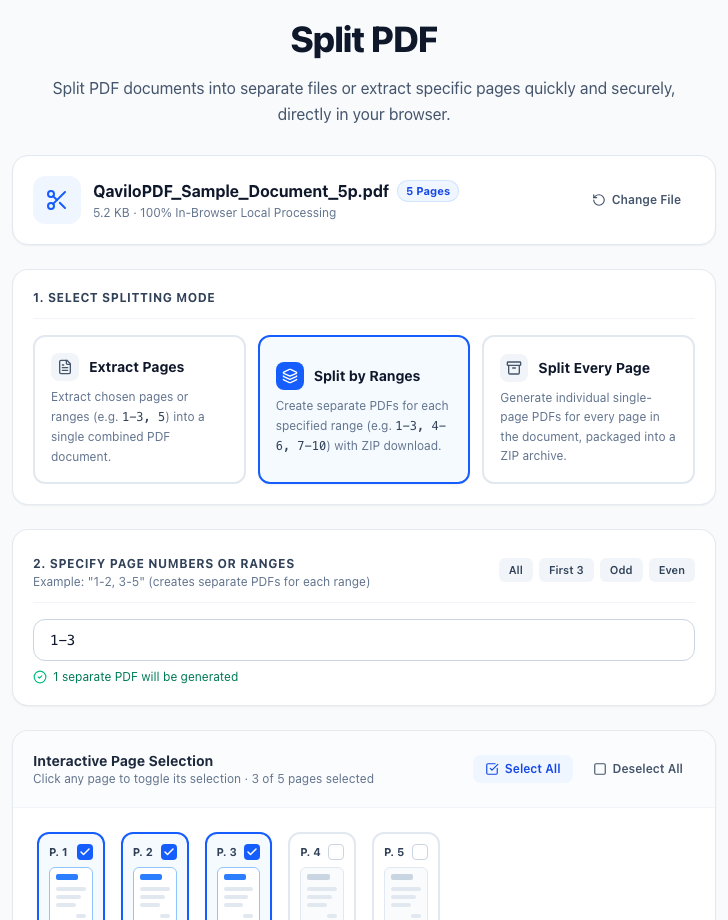
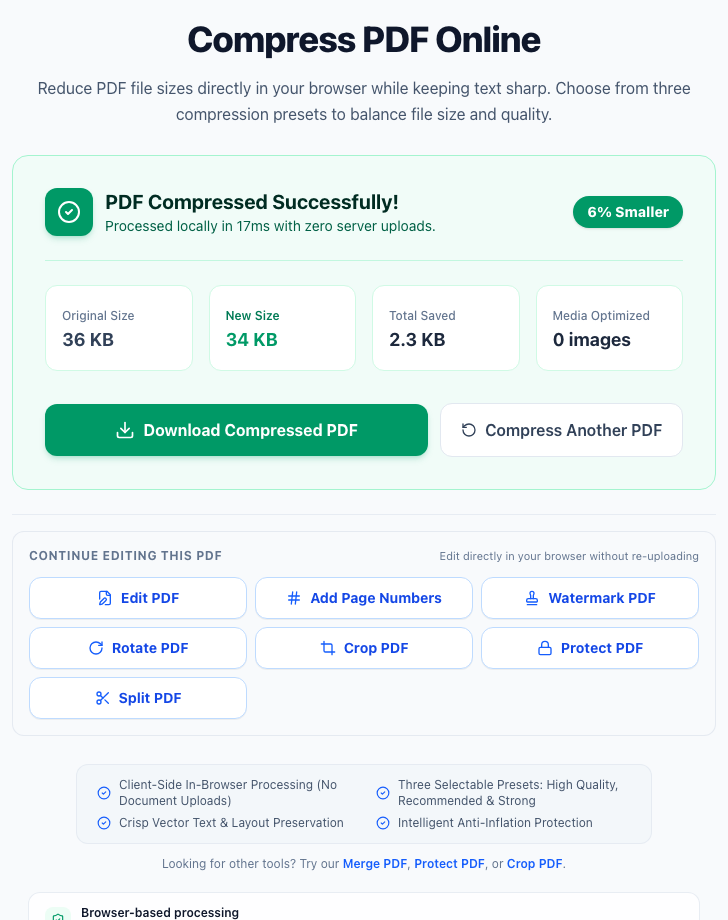
Observed QaviloPDF Interface & Workflow Evidence
Which PDF Tool Is Best for Each Task?
Merging PDFs: QaviloPDF, PDF24 Tools
QaviloPDF merges up to 20 files per batch (up to 50 MB per file / 150 MB combined) locally in browser memory without requiring an account; PDF24 offers unthrottled cloud or Windows offline merging (and iLovePDF free tiers cap around ~25 files per batch).
Open QaviloPDF Merging PDFsSplitting & Extracting Pages: QaviloPDF, PDF24 Tools
Client-side page extraction avoids uploading an entire multi-page PDF just to pull out two pages.
Open QaviloPDF Splitting & Extracting PagesCompressing PDFs: QaviloPDF, iLovePDF, PDF24 Tools
QaviloPDF compresses PDFs in-browser without daily task caps; iLovePDF and PDF24 offer strong server-side compression presets for non-sensitive files.
Open QaviloPDF Compressing PDFsConverting Word, Excel & CSV to PDF: QaviloPDF, iLovePDF, Adobe Acrobat Online
Word (.docx/.doc) layout fidelity requires a real document engine; QaviloPDF uses bounded LibreOffice WASM processing for Word and converts Excel (.xlsx) and CSV/TSV locally in-browser, while iLovePDF and Adobe cover PowerPoint and reverse PDF-to-Office.
Open QaviloPDF Converting Word, Excel & CSV to PDFEditing Existing PDF Text: QaviloPDF, Sejda
Both support modifying existing PDF text without watermarks. QaviloPDF runs in-browser without Sejda’s 3-tasks/hour free cap, while Sejda excels at quick paragraph reflows within its hourly limit.
Open QaviloPDF Editing Existing PDF TextWorking with Scanned Documents (OCR): QaviloPDF, PDF24 Tools
Most freemium tools (Smallpdf, iLovePDF, Adobe) gate OCR behind paid plans. QaviloPDF (in-browser Tesseract) and PDF24 provide free OCR without subscriptions.
Open QaviloPDF Working with Scanned Documents (OCR)Rotating & Organizing Pages: QaviloPDF, PDF24 Tools
Reordering, deleting, and rotating pages is fast in-browser on QaviloPDF with zero upload wait.
Open QaviloPDF Rotating & Organizing PagesProtecting & Unlocking Documents: QaviloPDF, PDF24 Tools
Applying or removing a known password locally in-browser avoids transmitting sensitive credentials and unencrypted bytes to third-party servers.
Open QaviloPDF Protecting & Unlocking DocumentsRepairing Damaged PDFs: QaviloPDF, PDF24 Tools, iLovePDF, Sejda
QaviloPDF runs QPDF WebAssembly locally in your browser (up to 50 MiB, with conservative verification capped at 60 pages and clear full, partial, password-required, or unrecoverable results) with no server upload. PDF24 Tools, iLovePDF, and Sejda provide cloud repair within their free-tier limits, though missing or overwritten content streams cannot be guaranteed to recover.
Open QaviloPDF Repairing Damaged PDFsWorking Without Sign-In: QaviloPDF, PDF24 Tools, Sejda
None of these three require creating an account for their core free tools, unlike Smallpdf’s frequent sign-in prompts or Adobe’s account-gated features.
Handling Privacy-Sensitive Files: QaviloPDF (client-side tools), PDF24 Creator (Windows offline), Sejda Desktop (offline)
For confidential records, local execution (either in-browser JavaScript/WebAssembly or an offline desktop app) minimizes third-party server exposure compared to cloud upload suites.
Browser-Based vs. Server-Side PDF Processing
Understanding where your document is processed explains most of the differences in speed, privacy, and format support across online PDF tools.
QaviloPDF uses a hybrid architecture: core PDF manipulation tools—including client-side JavaScript workflows, Tesseract.js OCR, and QPDF WebAssembly PDF repair—execute locally in your browser without server uploads, while Word-to-PDF conversion transfers the document over HTTPS to a bounded LibreOffice WebAssembly subprocess on the backend that processes files in transient memory without persistent storage.
Frequently Asked Questions
What is the best free online PDF tool?
The best free online PDF tool depends on your task and privacy needs. QaviloPDF is well suited for no-sign-up, in-browser merging, splitting, compressing, redacting, and editing without daily task caps, while PDF24 Tools offers unthrottled free online tools plus an offline Windows app, and Sejda is strong for quick direct text edits within its 3-tasks-per-hour free limit.
Can I edit existing PDF text for free?
Yes, though many suites restrict text editing to paid plans. QaviloPDF’s Edit PDF tool and Sejda both allow modifying existing PDF text for free without adding watermarks, whereas Smallpdf and Adobe Acrobat Online require paid subscriptions for direct text editing.
Which online PDF tools work without an account?
QaviloPDF, PDF24 Tools, Sejda, and TinyWow allow you to use their core free PDF tools without creating an account. iLovePDF and PDF2Go allow basic one-off tasks without registration, while Smallpdf and Adobe Acrobat Online frequently prompt for sign-in for fuller free access.
Are free online PDF tools safe for confidential files?
No networked software is entirely risk-free, so processing architecture matters. Tools that run locally in your browser (like QaviloPDF’s client-side PDF tools) or offline on your desktop (like PDF24 Creator or Sejda Desktop) avoid uploading confidential documents to third-party servers. Cloud-only tools typically transfer files over HTTPS and delete them after 1–2 hours.
Can I convert Word documents to PDF online?
Yes. QaviloPDF (via its bounded LibreOffice WASM backend), iLovePDF, Smallpdf, PDF24 Tools, PDF2Go, and Adobe Acrobat Online all support converting Word (.docx) files to PDF online.
What is the difference between browser-based and server-side PDF processing?
Browser-based tools execute JavaScript or WebAssembly directly on your device using local memory, avoiding file uploads and server queues. Server-side tools upload your file to remote cloud servers for processing, which helps with heavy cross-format conversions but depends on server retention policies and upload limits.
Which free PDF tool is suitable for occasional use?
For occasional one-off tasks, QaviloPDF, PDF24 Tools, and Adobe Acrobat Online (for Fill & Sign) work well. Smallpdf (2 tasks/day) and Sejda (3 tasks/hour) are also practical if your occasional workflow fits inside a couple of operations.
Can free online PDF tools repair corrupted or damaged PDF files?
Yes, for recoverable structural issues such as damaged cross-reference tables or truncated trailers. QaviloPDF includes a browser-based Repair PDF tool powered by QPDF WebAssembly inside a Web Worker (up to 50 MiB, with no upload to QaviloPDF servers) that separates full recovery, partial recovery, password-required, and unrecoverable outcomes using conservative verification capped at 60 pages. Cloud platforms including iLovePDF, PDF24 Tools, PDF2Go, and Sejda also offer online repair tools, whereas Smallpdf provides general troubleshooting workarounds; no tool can guarantee recovery of missing or overwritten data streams.
Related Comparisons & Guides
- Best Free Online PDF Editors
- Best Free PDF Compressors
- A Free, In-Browser Alternative to iLovePDF
- How to Merge PDF Files Privately and in the Correct Order
- How to Split a PDF or Extract Specific Pages Without Losing Important Content
Word to PDF | Merge PDF | Split PDF | Compress PDF | Edit PDF
Sources & Verification
QaviloPDF publishes this comparison and is one of the eight PDF tool suites evaluated above. QaviloPDF capabilities reflect local implementation inspection and regression testing, while competitor capabilities, free-tier caps, retention windows, and pricing details were researched using publicly available official product documentation and pricing pages rather than independent hands-on testing of every competitor.
Internal verification (2026-11-16): Internal codebase inspection of QaviloPDF client-side utilities (including QPDF WebAssembly Repair PDF) and bounded Word-to-PDF conversion paired with official vendor documentation and pricing pages; no external third-party audit conducted.
- QaviloPDF Free Online PDF Tools (QaviloPDF, verified 2026-11-16)
- iLovePDF Pricing & Plans (iLovePDF, verified 2026-11-13)
- Smallpdf Pricing & Free Plan Limits (Smallpdf, verified 2026-11-13)
- PDF24 Tools — Free Online PDF Tools (PDF24 / Geek Software GmbH, verified 2026-11-13)
- PDF2Go Pricing & File Limits (PDF2Go, verified 2026-11-13)
- Sejda PDF Pricing & Free Tier Limits (Sejda, verified 2026-11-13)
- Adobe Acrobat Online Free Tools (Adobe, verified 2026-11-13)
- TinyWow Free Online PDF Tools (TinyWow, verified 2026-11-13)