A Free, In-Browser Alternative to iLovePDF
Looking for a free alternative to iLovePDF? Compare document privacy, processing limits, and core features between QaviloPDF and iLovePDF to choose the right document utility for your workflow.
By QaviloPDF • Published 2026-11-11 • Last verified 2026-11-16
QaviloPDF vs. iLovePDF Feature Comparison
| Capability | QaviloPDF | iLovePDF |
|---|---|---|
| Pricing & Subscription | 100% Free — No paid tiers, no subscriptions, no paywalls | Freemium — Free tier with caps; published US Premium at $9/mo monthly or $60/yr ($5/mo annually); Custom Business tier |
| Account / Sign-Up Requirement | No Account Required — All PDF utilities run immediately without registration, email capture, or login prompts. | Optional for Basic / Required for Premium & AI — Free accounts save history; Premium or credit balances required for AI features, desktop apps, and high-volume tasks. |
| Core Document Processing | In-Browser (Client-Side) — Client-side JavaScript & WebAssembly (Tesseract.js for OCR, QPDF for Repair PDF); Word-to-PDF uses ephemeral server conversion | Cloud Servers (Web) / Local (Desktop) — Web tools process on remote cloud servers; iLovePDF Desktop (Premium) provides offline local processing |
| Server File Retention | No Server Storage for Client Tools — Client-side tools do not transmit document bytes to server disks or databases | Deleted in 2 Hours — Standard tools deleted after 2 hours; signature audit files kept up to 5 years |
| File Size Limits | Up to 50 MB (15 MB for Word) — 50 MB limit for PDF tools; 15 MB for Word-to-PDF | 15 MB – 200 MB (Free) / 4 GB (Premium) — Free limits depend on tool; 4 GB available on paid subscription |
| Batch Processing Limit | Up to 20 Files per Batch — Merge up to 20 PDFs; Word batch up to 20 files (150 MB total) | Up to 25 Files (Free) / 500 Files (Premium) — Free tier capped at ~25 files; higher volume reserved for paid users |
| Merge & Split PDF | Supported (Client-Side) — Reorder, rotate, combine, or extract pages directly in browser | Supported (Cloud) — Standard feature on both free and premium tiers |
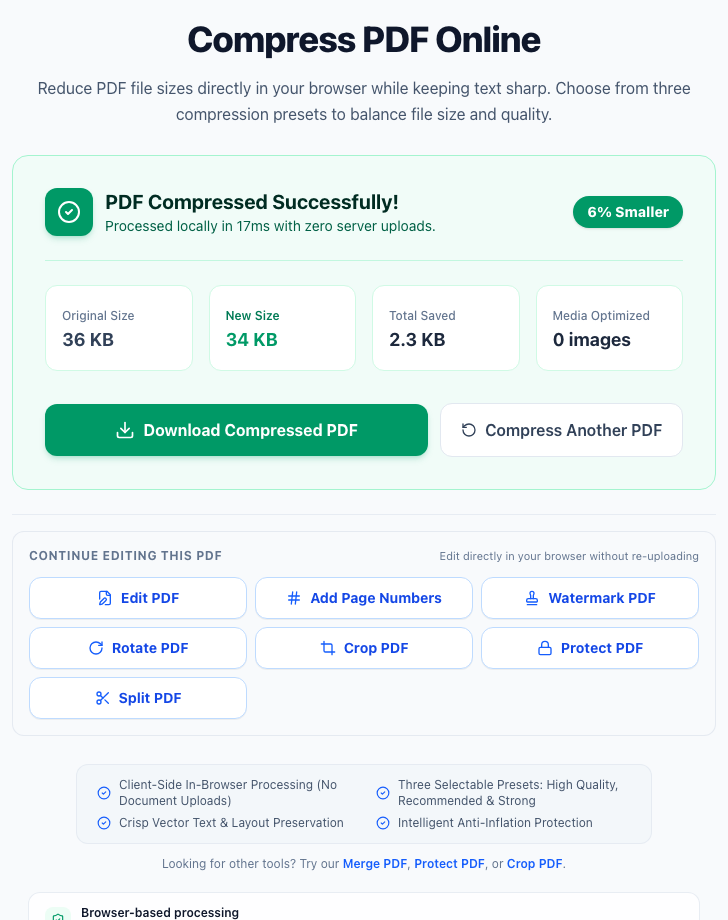
| Compress PDF | Supported (Client-Side) — Deflates streams and downsamples images locally without uploading | Supported (Cloud) — Server-side compression with basic and extreme presets |
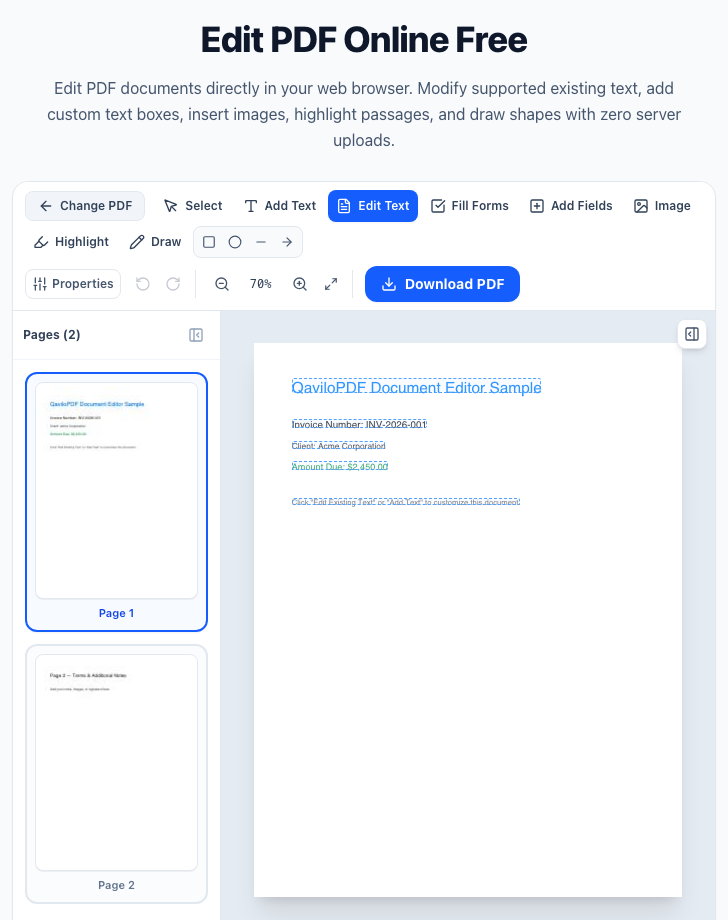
| Edit PDF & Form Builder | Supported (Text, Forms & Annotations) — Modify text with font matching, create AcroForm fields, add drawings | Supported (Annotations & Text Addition) — Add text, shapes, and images; limited modification of existing PDF text |
| OCR PDF (Searchable Text) | Supported (In-Browser Tesseract.js) — Up to 20 pages (desktop) or 5 pages (mobile) recognized locally | Basic OCR (Free) / Full OCR (Premium) — Scanned PDF to editable Word/Excel requires Premium subscription |
| Word to PDF Conversion | Supported (.docx / .doc) — High-fidelity server-side conversion with transient memory handling | Supported (Office Suite) — Cloud-based conversion for Word, Excel, and PowerPoint |
| Excel & PowerPoint to PDF | Excel (.xlsx) & CSV Only — Converts .xlsx and .csv/.tsv locally in browser; PowerPoint (.pptx) not supported | Supported — Converts Excel (.xlsx) and PowerPoint (.pptx) to PDF |
| PDF to Word / Excel / PPT | Not Supported — Reverse conversion to Microsoft Office formats is not available | Supported (OCR on Premium) — Converts PDF back to Word, Excel, and PowerPoint files |
| Permanent PDF Redaction | Supported (200 DPI Flattening) — 200 DPI page rasterization burns black bars into pixels so hidden text cannot be copied | Supported (Cloud Redact Tool) — Black-out text and visual areas on cloud servers |
| Compare PDF Differences | Supported (Side-by-Side Visual & Text) — Side-by-side inspection, pixel diff overlays, and text change indicators | Supported (Compare Tool) — Compare two PDF files side-by-side |
| Repair Damaged PDFs | In-Browser (QPDF WASM, 50 MiB) — Structural repair via local QPDF WebAssembly with no backend upload; reports full, partial (60-page verification cap), password-required, or unrecoverable status | Supported (Cloud Repair PDF) — Uploads damaged PDFs to iLovePDF cloud servers for automated structural recovery |
| Offline Desktop & Mobile Apps | Web Only (Mobile-Responsive) — Accessible via standard web browsers; no installable native application | Native Desktop & Mobile Apps — Standalone Windows/Mac desktop apps and iOS/Android mobile apps |
| Digital Signatures | Visual Electronic Signatures — Draw, type, or stamp visual signatures; no cryptographic certificate audit trail | Visual & Certified Signatures — Visual signing on free; eIDAS-compliant digital certificates on Premium |
Observed QaviloPDF Interface & Workflow Evidence
How In-Browser Processing Protects Your Documents
Understanding the technical difference between browser-based processing and cloud-based file processing:
Sources & Verification
QaviloPDF publishes this comparison and is one of the two PDF platforms evaluated above. QaviloPDF capabilities reflect internal implementation inspection and regression testing, while iLovePDF capabilities, file-size limits, retention policies, and pricing tiers were researched using iLovePDF’s publicly available official documentation, security statements, and pricing pages as of November 2026.
Internal verification (2026-11-16): Documented against publicly accessible iLovePDF terms, pricing tiers, and capabilities in November 2026, alongside QaviloPDF client-side QPDF WebAssembly Repair PDF verification.
- QaviloPDF Free Online PDF Tools (QaviloPDF, verified 2026-11-16)
- iLovePDF Pricing and Plans (iLovePDF, verified 2026-11-14)
- iLovePDF Repair PDF Documentation (iLovePDF, verified 2026-11-16)
- iLovePDF Security & ISO/IEC 27001 / GDPR Compliance (iLovePDF, verified 2026-11-14)
- iLovePDF Privacy & Terms of Service (2-hour retention & signature storage) (iLovePDF, verified 2026-11-14)
iLovePDF® is a registered trademark of its respective owner. QaviloPDF is an independent web application and is not affiliated with, sponsored by, or endorsed by iLovePDF. All comparative information presented is based on publicly available documentation, pricing pages, and product specifications verified in November 2026. Features, regional pricing, and limits of third-party services are subject to change by their respective operators.
Frequently Asked Questions
How is QaviloPDF different from iLovePDF?
The primary difference lies in processing architecture, pricing, and account requirements. For browser-side operations (merging, splitting, compressing, editing, page numbering, password protection, redaction, and PDF repair), QaviloPDF processes your files locally inside your web browser using client-side JavaScript and WebAssembly engines (Tesseract.js for OCR and QPDF for Repair PDF) without remote uploads, and requires no accounts or subscriptions. iLovePDF is a commercial cloud platform whose web services process files remotely (with documented 2-hour automatic deletion for standard tasks) and also offers paid Premium plans ($9/month monthly or $60/year billed annually in published US pricing) with an offline Desktop app.
Are my documents uploaded to a server when using QaviloPDF?
For browser-side PDF tools (including Merge, Split, Compress, Edit, Rotate, Crop, Sign, Protect, Unlock, Redact, OCR, Compare, and Repair PDF), documents are processed locally on your device using client-side JavaScript engines, browser Web Workers, and WebAssembly where applicable (such as Tesseract.js for OCR and QPDF for Repair PDF). The only exception is Word-to-PDF (.docx/.doc), which sends files over HTTPS to QaviloPDF’s conversion server for bounded LibreOffice WebAssembly processing and automatic temporary file cleanup.
Can QaviloPDF and iLovePDF repair damaged or corrupted PDF files?
Yes. QaviloPDF offers a browser-based Repair PDF tool powered by QPDF WebAssembly inside a dedicated Web Worker for files up to 50 MiB, with no file upload to QaviloPDF’s backend. It attempts structural recovery on damaged PDFs and distinguishes full recovery, partial recovery, password-required, and unrecoverable outcomes using conservative verification (up to a 60-page verification cap), though missing or overwritten content streams cannot be guaranteed to recover. iLovePDF offers a cloud Repair PDF tool that uploads damaged documents to iLovePDF servers for recovery.
What are QaviloPDF's file size and batch limits?
QaviloPDF supports files up to 50 MB for browser-based PDF tools (50 MiB for Repair PDF, with conservative verification capped at 60 pages) and up to 20 files per merge session (150 MB combined merge cap). OCR PDF supports up to 20 pages on desktop and 5 pages on mobile browsers. Word to PDF supports files up to 15 MB per DOCX/DOC and batches up to 20 files (150 MB aggregate). Unlock PDF supports AES-256 and RC4 passwords (AES-128 unsupported). By comparison, iLovePDF free tasks allow roughly 15–200 MB depending on tool, reserving up to 4 GB / 500-file batches for paid plans.
Does QaviloPDF convert Excel or PowerPoint files?
Yes for Excel spreadsheets (.xlsx) and CSV/TSV files, which QaviloPDF converts to PDF directly in your browser. Legacy .xls workbooks and PowerPoint presentations (.pptx, .ppt) are not supported, and reverse PDF-to-Office conversions are unavailable. If you need PowerPoint conversions or PDF-to-Office export, iLovePDF provides those tools.
Can I use QaviloPDF offline without an internet connection?
QaviloPDF is delivered as a mobile-responsive web application requiring an active internet connection to initially load the page and browser scripts. It is not packaged as a standalone offline desktop installer. For users who require offline desktop software without a browser, iLovePDF Desktop (with an iLovePDF Premium subscription) is a dedicated option.
Is QaviloPDF affiliated with iLovePDF?
No. QaviloPDF is an independent service created by QaviloPDF. iLovePDF® is a registered trademark of its respective owner. All product names, trademarks, and registered trademarks mentioned are property of their respective owners. This comparison is provided for informational purposes based on publicly accessible product documentation and terms verified in November 2026.