Are Online PDF Converters Safe? Browser-Based vs. Server-Based Processing Explained
Every day, millions of people upload bank statements, employment contracts, medical records, and tax forms to free online PDF converters. But what actually happens to your files once you drop them into a browser window? Understand the architectural differences between browser-based and server-based PDF tools, evaluate real privacy risks, and learn how to protect sensitive documents.
The Core Dilemma: Convenience vs. Document Confidentiality
Almost every student, freelancer, corporate employee, and small business owner encounters the same sudden hurdle: a government portal demands a PDF under 2 MB, a hiring manager requests a single combined portfolio file, or a signed lease arrives as an uneditable scanned image. In that moment of urgency, the fastest solution is often a quick web search followed by dragging the file into the first free online PDF converter that appears on the search results page.
A moment after clicking convert, however, an uncomfortable question often arises: where did that file just go? Who has access to it? Could someone read the social security number, bank account balance, medical diagnosis, or confidential salary negotiation contained inside those pages?
These concerns are entirely justified. A PDF document is rarely just generic text. In modern business and personal workflows, PDFs serve as the digital equivalent of legal paper. They hold mortgage applications, intellectual property filings, litigation discovery exhibits, corporate balance sheets, and passport scans. Treating all online PDF utilities as identical black boxes creates significant privacy blind spots.
What Actually Happens When You Use an Online PDF Converter
To evaluate the safety of any web utility, you must trace the lifecycle of a document from the instant you choose a file on your device until the final output file is stored on your hard drive. Most online utilities follow one of two fundamentally distinct operational lifecycles.
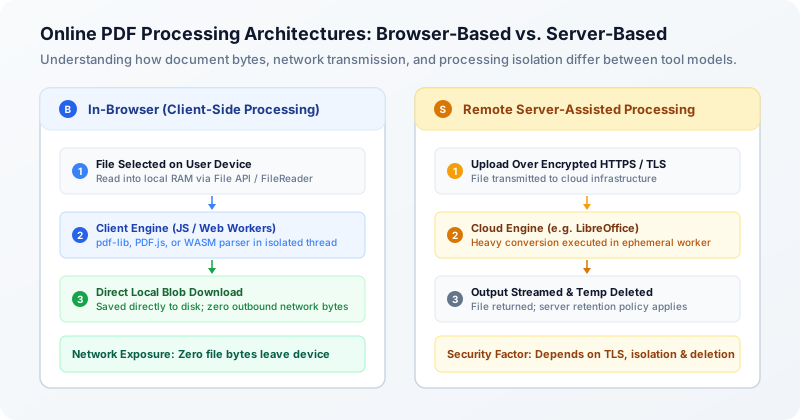
In a traditional server-based workflow, three distinct phases take place across the public internet:
- File Selection & Upload: When you select a document, your browser opens an HTTP POST request and streams the raw binary file across the internet to the provider cloud infrastructure.
- Server Storage & Ingestion: The file is received by a web server, written to an ephemeral scratch disk or temporary object storage bucket, and placed into a processing queue.
- Worker Execution & Transformation: A backend background worker process (such as a headless LibreOffice container, Ghostscript binary, or proprietary PDF parser) reads the temporary file, executes the requested transformation, and writes an output PDF to disk.
- Download Delivery & Retention: The service generates a unique download link. Your browser downloads the resulting file, after which the server applies an automated or scheduled retention policy to delete temporary assets.
By contrast, a modern client-side workflow eliminates the remote infrastructure stages altogether. When you select a file in a client-side tool, the browser reads the file bytes directly into local device memory (RAM) via standard HTML5 File APIs. The document is modified entirely on your local CPU by code running inside your browser session, and the final output is saved directly to your downloads folder without transmitting a single document byte across the network.
Browser-Based (Client-Side) PDF Processing Explained
Over the past decade, web browsers have evolved from simple document viewers into sophisticated execution environments capable of running complex desktop-grade software. This transformation makes client-side PDF processing possible.
In a browser-based workflow, the website code acts as a self-contained application loaded into your browser tab. Document operations rely on specialized JavaScript libraries (such as pdf-lib for PDF manipulation or PDF.js for vector rendering) and, where applicable, WebAssembly (WASM) binaries compiled from high-performance languages like C++ or Rust. It is important to note that not all client-side tools require WebAssembly; many core PDF manipulation tasks, such as page reordering, compression, splitting, and annotation, execute efficiently using pure client-side JavaScript.
To prevent complex PDF operations from freezing the user interface, modern web applications delegate intensive tasks to background execution threads known as Web Workers. When you merge twenty PDF files or compress high-resolution raster imagery, a dedicated worker thread processes the binary data in isolation, leaving the main interface smooth and responsive.
While browser-based processing offers unmatched privacy benefits, it also faces genuine technical constraints:
- Memory Allocation Limits: Web browser tabs operate within strict memory sandboxes (typically between 1 GB and 4 GB of RAM depending on the operating system and browser). Attempting to process gigantic PDF files with thousands of pages can exceed browser memory thresholds and cause the tab to crash.
- Mobile Device Limitations: Mobile smartphones and budget tablets have aggressive memory managers that may terminate background browser tabs during intensive computational tasks.
- Format Conversion Complexity: Converting proprietary office formats (such as Microsoft Word .docx, PowerPoint .pptx, or legacy .doc files) requires extensive layout engines, font rendering libraries, and complex typography subroutines that are difficult to package into lightweight client-side browser bundles.
Processing a document in your browser reduces the need to send its contents to a conversion server, but it does not eliminate every security risk. Malicious browser extensions, compromised devices, and files left in Downloads on shared computers can still expose sensitive information. Use trusted devices, review extension permissions, and remove confidential downloads when appropriate.
Server-Based PDF Processing: Architecture, Safeguards, and Risks
Despite the clear privacy advantages of client-side execution, server-based processing remains widespread across the web. Understanding why providers use servers is essential: it is not necessarily driven by data harvesting, but frequently by genuine technical necessity.
Converting complex file formats—such as transforming a heavily formatted Microsoft Word document into a pixel-perfect PDF—requires an industrial layout engine. Most high-fidelity converters rely on software suites like LibreOffice or specialized commercial conversion toolkits running inside Linux container environments. Packaging these multi-hundred-megabyte engines into a browser download would result in massive page load times that fail on slower internet connections.
Similarly, advanced server-side Optical Character Recognition (OCR) engines and high-volume batch processing often demand specialized server CPUs and dedicated graphic processing hardware that cannot reasonably run inside standard mobile browser tabs.
When evaluating server-based tools, it is inaccurate to claim that all server-side processing is automatically insecure. Reputable commercial providers implement robust engineering safeguards to protect documents during transit and processing:
- Transport Layer Security (TLS/HTTPS): Encrypts file data in transit between your browser and the server, protecting against eavesdropping or interception on local Wi-Fi networks.
- Ephemeral Container Isolation: Executes conversions inside isolated virtual containers that do not share memory or process space with other concurrent users.
- Automated Deletion Lifecycles: Deletes both uploaded input files and generated output files shortly after conversion, typically ranging from immediate deletion upon download to a 1-hour or 2-hour retention window.
- Encrypted Temporary Storage: Encrypts temporary volumes at rest so that raw file contents cannot be accessed directly from underlying storage media.
Direct Architecture Comparison: Browser-Based vs. Server-Based
To help you decide which approach is appropriate for your specific document needs, the table below compares browser-based and server-based processing across the most critical operational dimensions:
| Evaluation Dimension | Browser-Based (Client-Side) | Server-Based (Cloud Processing) |
|---|---|---|
| Data Transfer & Network Exposure | Zero document bytes leave your device. All reading and writing occurs in local RAM. | Files stream across the internet via HTTPS to remote cloud infrastructure. |
| Processing Location | Local CPU and browser execution threads (JavaScript, Web Workers, WebAssembly). | Remote server containers or virtual machines (e.g., Linux, LibreOffice). |
| Document Retention Risk | Zero retention risk on external servers; files exist only in your local browser session. | Files reside on remote servers for minutes or hours until deleted by automated cleanup jobs. |
| Verifiable Isolation | Independently verifiable via browser DevTools Network tab or by working offline. | Requires trusting vendor legal privacy policies and internal operational security claims. |
| File Size Limits | Typically bounded by device RAM (e.g., up to 50 MB to 100 MB per file). | Can handle larger files (up to hundreds of megabytes) if server storage permits. |
| Format Compatibility | Best for PDF-to-PDF tasks (compress, merge, split, edit, redact, page numbering). | Required for complex external format conversions (e.g., Word .docx to PDF). |
| Offline Functionality | Standard client-side operations may continue offline within an already loaded browser session. However, a fresh offline page load is not guaranteed because QaviloPDF does not currently implement a Service Worker for offline application caching, and features requiring additional resources (such as OCR language data or certain WebAssembly assets) may need network access unless those resources have already loaded. | Server-based conversion requires a functioning network connection to communicate with the processing server. |
As the comparison shows, neither architecture is universally superior for every use case. Browser-based processing provides the gold standard for confidentiality during standard PDF manipulation, whereas server-assisted processing provides the heavy computational horsepower needed for format conversions.
Are Free Online PDF Converters Safe? A Practical Analysis
A common maxim on the modern internet warns: "If you are not paying for the product, you are the product." Does this apply to free online PDF converters? In many cases, yes—though the monetization mechanisms vary considerably across different categories of websites.
To understand whether a free tool is safe, you must identify how the service covers its server, bandwidth, and development costs. The online PDF landscape is primarily divided into three distinct operational models:
- Freemium Commercial Platforms: Established companies offer free basic conversions with tight daily usage caps or file size restrictions, using the free tier as a marketing funnel to sell recurring monthly subscriptions to enterprise and professional users.
- Ad-Supported Privacy-First Tools: Lightweight web utilities fund infrastructure through non-intrusive programmatic display advertisements while keeping core processing in the user browser, thereby minimizing cloud server hosting expenses.
- Predatory or Data-Monetizing Services: Obscure web properties with anonymous ownership that monetize free traffic through aggressive deceptive advertising, bundling unwanted browser extensions, or collecting user metadata and document contents for marketing profiling.
Seven Things to Check Before Uploading a Sensitive PDF
Before dropping an employment contract, tax filing, or medical form into an online converter, run through this practical seven-point inspection checklist to safeguard your confidential information:
- Verify Processing Architecture: Does the provider explicitly explain whether processing occurs client-side in your browser or server-side on remote infrastructure? Services that disclose their architecture transparently are inherently more accountable.
- Inspect the Data Retention Policy: If files are processed on a server, does the privacy policy state an explicit automated deletion timeframe (e.g., immediately, 1 hour, or 24 hours)? Avoid services with vague statements like "files may be retained for system maintenance."
- Confirm Document Ownership Terms: Check the terms of service to ensure you retain 100% ownership of uploaded content. Ensure there are no clauses granting the provider rights to inspect, index, or use your documents to train artificial intelligence models.
- Verify HTTPS Transport Encryption: Ensure the website displays a valid security padlock in the address bar (HTTPS). Never transmit documents over unencrypted HTTP connections where data can be intercepted by anyone sharing your local network.
- Check Account and Permission Demands: Be wary of tools that demand unnecessary personal information, mandatory Google or social logins, or intrusive browser permissions just to perform a simple one-off conversion.
- Identify the Operating Entity: Look at the website About page, contact details, and legal imprint. Is the service operated by an identifiable legal entity with a verifiable jurisdiction, or is it an anonymous domain with no contact information?
- Test Network Activity with DevTools: For tools claiming in-browser processing, open DevTools Network tab and verify that converting a document triggers zero binary upload requests.
How QaviloPDF Handles Processing: Truthful Hybrid Architecture
At QaviloPDF, we believe privacy claims must be rooted in verifiable software architecture rather than marketing rhetoric. We explicitly reject unprovable claims such as "100% secure" or "guaranteed unhackable," because no connected software system can make such guarantees. Instead, we disclose our exact hybrid operational model so users can make informed choices:
1. In-Browser Document Manipulation Tools
For core PDF management tasks—including Compress PDF, Merge PDF, Split PDF, Edit PDF, Redact PDF, Protect PDF, and Unlock PDF—processing executes locally inside your web browser. Document files are read into local RAM, modified via client-side JavaScript (pdf-lib) and Web Workers, and saved directly back to your device. Zero document bytes are transmitted to QaviloPDF servers.
2. Ephemeral Server-Assisted Conversions (Word-to-PDF)
For complex format conversions that cannot run reliably inside client browsers—specifically Word to PDF (.docx conversion)—QaviloPDF utilizes an isolated, ephemeral backend service hosted on Render. When you convert a Word document, the file is securely transmitted with HTTPS/TLS encryption in transit, converted inside a sandboxed LibreOffice process, and streamed back to your browser. The file is held strictly in temporary storage and deleted immediately upon conversion completion or failure. We do not store, inspect, index, or retain your documents.
When You Should Use an Offline Desktop Tool Instead
While in-browser tools offer strong privacy protections for everyday tasks, there are specific scenarios where organizational policy, regulatory compliance, or sheer file scale dictate using dedicated offline desktop applications (such as Adobe Acrobat Pro, PDF-XChange Editor, or open-source desktop suites).
- Strict Regulatory Mandates (HIPAA, CJIS, Classified Data): Healthcare organizations handling Protected Health Information (PHI) under HIPAA, law enforcement agencies handling CJIS records, or defense contractors managing classified information often have strict compliance policies prohibiting the use of web browsers for document processing regardless of client-side architecture.
- Air-Gapped Corporate Environments: Highly secure enterprise or financial networks may operate without direct internet access. Web applications cannot load in air-gapped environments without local intranet hosting.
- Massive File Sizes Exceeding Browser Limits: PDFs containing thousands of pages, architectural blueprints with complex vector paths, or uncompressed multi-gigabyte graphic documents exceed the memory allocations of web browsers. Desktop tools with direct access to virtual memory and disk caching are necessary for files above 500 MB.
- Complex Legal Discovery & Bates Batching: Litigation workflows requiring advanced Bates stamping, forensic metadata extraction, or automated redaction across tens of thousands of court filings require dedicated on-premise legal software suites.
Frequently Asked Questions About PDF Converter Safety
Below are answers to the most frequent technical and security questions users ask when evaluating online PDF tools:
Conclusion: Matching Tool Architecture to Document Sensitivity
Online PDF converters are neither universally dangerous nor universally secure. The safety of your document depends entirely on the alignment between the sensitivity of your file and the technical architecture of the tool you choose.
For everyday documents containing sensitive personal, financial, or corporate information, prioritize tools that process files locally inside your browser. With utilities like QaviloPDF Compress PDF, Merge PDF, and Edit PDF, your document data never leaves your device memory.
When you require complex format transformations like Word to PDF, use reputable services with HTTPS/TLS encryption in transit, ephemeral isolated containers, and immediate post-conversion deletion. And when handling legally restricted or classified material, rely on dedicated offline desktop software.
Ready to test this workflow on your document?
Optimize, merge, or edit PDF documents directly inside your browser. Document manipulation tools run locally in client memory with zero file bytes sent across the network.
Frequently Asked Questions
Can online PDF converters steal or store my sensitive documents?
If a tool uses server-based processing, the provider receives an exact copy of your document file on their infrastructure. While reputable providers implement automated deletion jobs, unscrupulous or unverified sites could theoretically inspect, store, or log uploaded files. In contrast, client-side browser tools process files exclusively inside your local device memory, meaning no document bytes are transmitted across the internet to the provider.
How can I tell if an online PDF converter is processing files on my computer or on a server?
You can verify processing location using your web browser Developer Tools. Press F12 (or right-click and choose Inspect), navigate to the Network tab, and process a document. If the tool is server-based, you will see an HTTP POST or PUT request uploading a payload matching your file size. If the tool is client-side, you will see zero outgoing file upload requests, and once required assets are loaded into your browser session, supported client-side tools can continue processing documents without a continuous internet connection.
Is client-side browser processing safer than server-based conversion?
From a data privacy perspective, yes. Client-side processing dramatically reduces exposure because your confidential document never traverses the public internet, never enters third-party server memory, and never touches remote hard drives. However, server-based processing remains necessary for complex conversions like Word-to-PDF that require heavy desktop-grade layout engines.
Do free PDF converters use my documents to train artificial intelligence models?
Some free cloud-based document platforms include broad data-use clauses in their terms of service permitting them to analyze uploaded content to improve algorithms or train machine learning models. Reputable tools explicitly prohibit using customer files for model training and delete data promptly. Browser-based tools that execute locally cannot use your files for AI training because your document content never reaches their servers.
What should I do if I accidentally uploaded a confidential document to an untrusted converter?
If you inadvertently uploaded sensitive data (such as financial credentials, passwords, or identity documents) to an unverified service, take immediate protective steps: change any exposed passwords or PINs, monitor relevant financial accounts for unauthorized activity, notify your organization's IT security team if corporate data was involved, and place a fraud alert or credit freeze with credit bureaus if government identification numbers were exposed.
Related Reading & Guides
Why Is Editing PDF Text So Difficult? Fonts, Layouts, and Common Problems Explained
Ever tried editing a single word in a PDF only for the text to overlap adjacent sentences, shift positions unpredictably, or appear in the wrong font? Discover why PDFs are digital printouts rather than flowing documents, how fixed coordinates and font subsetting complicate edits, and how modern in-browser editors navigate these technical constraints.
articleHow to Edit Existing Text in a PDF Without Changing the Layout
Need to fix a typo, update a date, or change a price in a PDF without shifting nearby paragraphs or breaking your alignment? Follow this practical step-by-step workflow to edit existing PDF text in your browser, preserve page geometry, and verify the exported file.
articleHow to Compress a PDF Without Losing Readability
Need to shrink a PDF for Gmail, Outlook, or an upload portal without turning text blurry? Learn the six technical causes of PDF bloat, exact email attachment ceilings accounting for MIME encoding overhead, and how to compress files privately in your browser.
articleHow to Merge PDF Files Privately and in the Correct Order
Need to combine multiple PDF documents into a single organized packet without sending confidential files to a remote cloud server? Learn how in-browser PDF merging works, how to arrange files in the correct sequence, what happens to vector typography and forms, and how to verify your final combined document.
articleHow to Split a PDF or Extract Specific Pages Without Losing Important Content
Need to isolate a single chapter, pull signed contract pages, or divide a multi-page report into manageable files? Learn the critical difference between splitting and extracting, avoid the physical index trap, understand the limits of virtual printing, and see how bookmarks, hyperlinks, and form fields behave during extraction.